Today, the API economy is a thriving industry in which many of the solutions and best practices have reached a well-seasoned maturity (although there's still plenty room for improvement). As such, we at ProgrammableWeb thought it was finally a great time to launch an Editors' Choice program in which we draw attention to the best practitioners when it comes to developer engagement. Particularly when it comes to how API providers engage their developer communities through developer portals, other online presences, and physical world engagement.
But before we could launch such a program, we thought it would be best to transparently establish and publish a baseline methodology so that the entire industry had some idea of what we at ProgrammableWeb believed to be the state of the art when it comes to developer engagement. At the same time, we also realized that this same standard could serve as an aspiration for many API providers looking to improve upon their engagement tradecraft. So, what follows isn't just the basis of how we judge the many developer portals that we encounter in the course of reporting the news of the API economy or running ProgrammableWeb's API directory. It's also a guide to any API provider looking to win the hearts and minds of developers, regardless of whether they are internal or external to their organizations.
As we see more advancements and innovations in the area of developer engagement, we will very likely take them into consideration as part of this standard. In other words, we'll be updating this document on a regular basis. Shortly after we publish the first version of this document, we also plan to start publishing our editors' choices for excellence in developer engagement.
Introduction
In the past, an API developer portal was simply the place where providers housed their API documentation. And for those early days of the API economy, that was certainly sufficient. But as more organizations start to understand the competitive role that APIs will play in establishing their businesses as game changing platforms, the more their API developer portals bear significant responsibility for brand positioning and marketing, partner and developer recruitment and communications, and ultimately business success.
As evidenced by some of the world's leading API providers such a Twilio, GitHub, and Stripe — companies that have generated significant success through their API strategies — the API developer portal must be viewed as the shiny new shingle that organizations hang on the Internet to say that they're open for digital business. Simply put, a developer portal can no longer be just about documentation (as it once was).
Today, your API developer portal is where current and future stakeholders will go to learn everything possible about your API(s) and even your company, both from a technical standpoint and also just as importantly, from a business standpoint. Whether it's intended for internal consumption behind your firewall, external consumption by third party developers and partners, or both, your APIs represent you and your business. The finish and elegance of the user experience and the degree to which it breeds confidence across the various participants in your digital ecosystem will be a deciding factor in who wins and who loses in each industry. Your APIs are actually products and you should treat them as such.
What goes into an industry-leading API portal? To create the best portal for you and your developers, ProgrammableWeb walks you through what some of the top providers are doing, what their best practices are, and the elements and neat conveniences that make for a great API portal. It should be noted that while many API providers are putting a variety of industry-leading best practices to work in their API portals, no single API provider puts them all to work. In other words, there's room for improvement in every API portal we've seen.
Editor's note: As previously noted, this article draws on many examples of great developer portal best practices from all over the API economy. Wherever possible, we link to the actual examples so you can see for yourself. However, please be aware that by the time you read this, some of those examples may have changed or may no longer work as described. We'll do our best to keep this document as up-to-date as possible.
A portal has many jobs to fill, including (just to name just a few):
- Articulation of the organization's unique value proposition as an API-enabled Business-as-a-Platform (BaaP) to its stakeholders
- Clearly stating each API's business case and suggesting the types of problems it can solve
- Having top-notch documentation that's as easily consumed by beginners as it is by experts
- Helping developers to begin sampling and working with the API quickly (what we at ProgrammableWeb like to call "Time to Hello API!")
- Establishing trust in the API provider as a business, confidence in the security and reliability of the APIs, and providing world-class support
We'll show you the API portals that do this well and we'll even call out some that don't quite hit the mark. We even have some ideas for world-class developer portal features that have yet to be observed in the wild. Armed with this information, nothing stands between you and building a truly standout portal that engenders interest in your API-led BaaP while launching your API-consuming developers confidently into their projects.
1. The API as the Problem Solver
Are developers the only audience interested in visiting your portal? Absolutely not. APIs have moved beyond being an IT concern, and choosing them now involves numerous organizational stakeholders. In terms of non-developers, that audience includes business executives from other organizations who are often looking for partners to help them co-create better end-to-end customer experiences.
For example, in May 2017, McDonalds started working with UberEats to enable its franchisees with a home delivery option. APIs were the ultimate enablers of the new end-to-end customer experience. But interest in co-creating that experience began at the business level. With this increased range of stakeholder types, your portal's target audience is more varied than ever and the portal's content and organization should be designed to address that diversity.
According to Brad Fults, head of Run Engineering & Connected Devices at fitness gear manufacturer Under Armour , four major categories of audience types will visit your portal: newcomers, debuggers, decision-makers, and searchers. While developers and product managers are likely to comprise the majority of users across those audiences, the decision-makers will often include a CTO or, in some cases, even the CEO. At this stage of their API discovery, the decision-makers need to understand exactly what your API does, how it fits in with their businesses, and how the API can help solve their specific problems.
Let's look at our first example of a top provider. In Figure 1 below, we see a partial screenshot of BBVA's services home page. First up is the business proposition letting decision-makers know how BBVA's APIs can be used to process payments, build a Customer Identification Program (CIP), or access deposit accounts and debit cards. This is unambiguous and at a high level and it lets decision-makers know what they can expect from BBVA's APIs. Below the header, the home page includes calls to action (CTAs) that provide more narrowly-defined unique value propositions (UVPs) for each of the individual APIs.

Figure 1: BBVA's services home page greets you with a clearly articulated unique value proposition, which is something that's sadly missing from many API developer portals.
Going one step beyond explaining the business case for an API, you also want your landing page to address how your APIs can solve a developer's specific problems. Providing use cases works well not only for an executive-level audience but also for visitors who work at a product level and who are hoping to understand all the possibilities enabled by your APIs (and which of these map to their needs).
Use cases can be presented in a couple of ways. The first is to have a summary or bullet list on the portal home page that highlights the problems your API solves and how it does so. The second and more preferred option is to write a detailed narrative that resides on its own page. For this option, you need to give the user a clear way to find the use cases either through links on the home page or within the portal’s navigation.
If you choose to craft a detailed narrative, your descriptions must focus on outcomes as opposed to listing a set of features. Keith Casey, a developer and engineer who, at the time of this paper’s publication, was focused on identity and authentication with the access management company Okta, describes this content as the storytelling style
of documentation. According to Casey, "A user may come to your website asking, 'I’m not 100% sure what you do or why I should use it, [so] tell me a short story. Convince me that you understand the space and you can help me.'“
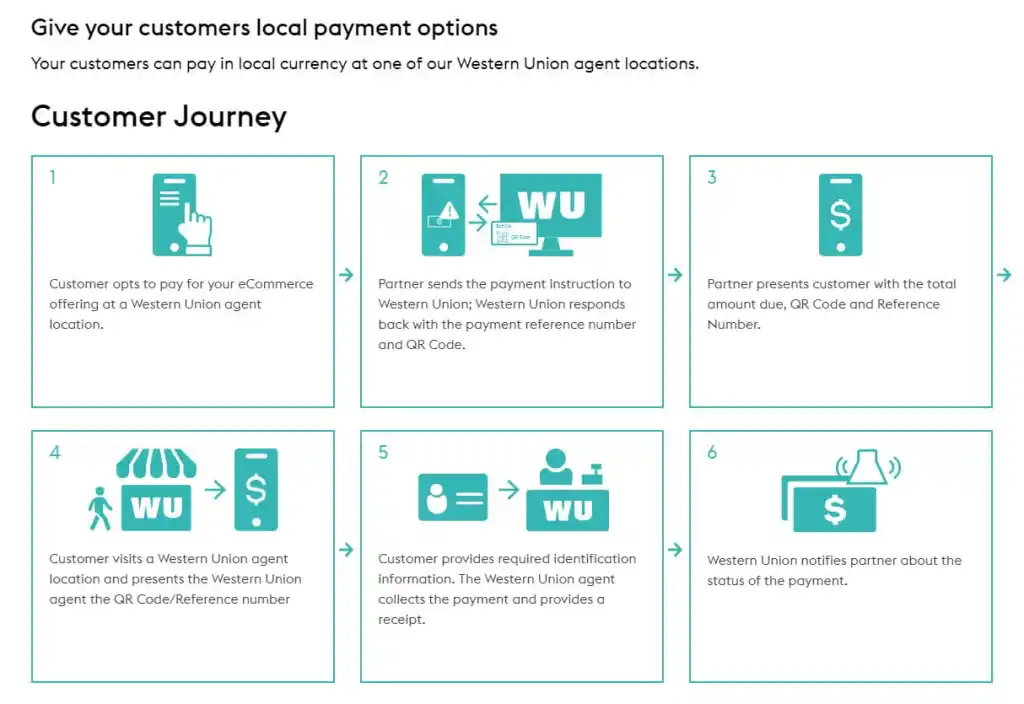
Figure 2: The use cases on Western Union’s portal use attractive graphics to convey brief and to the point outcomes for users of its APIs.
Western Union chooses to tell its “stories” by using attractive step-by-step sets of graphics with accompanying text. This treatment simplifies each use case into an easy to follow workflow that could easily resemble the same business process at any other company. It shows that Western Union understands a user's needs and how its APIs can meet them when in the hands of a competent developer.
Case studies (presented in text, images, video, or a combination of all three) allow developers to dive deeply into real-world customer solutions that use your APIs or SDKs (software development kits). These use cases are a wonderful way to help decision-makers understand your product's benefits and to demonstrate its trustworthiness by showing how others have used it successfully.
Facebook, another top API provider , offers a great set of case studies (or what they call "success stories") on its API portal to educate visitors who are still in a decision-making mode.
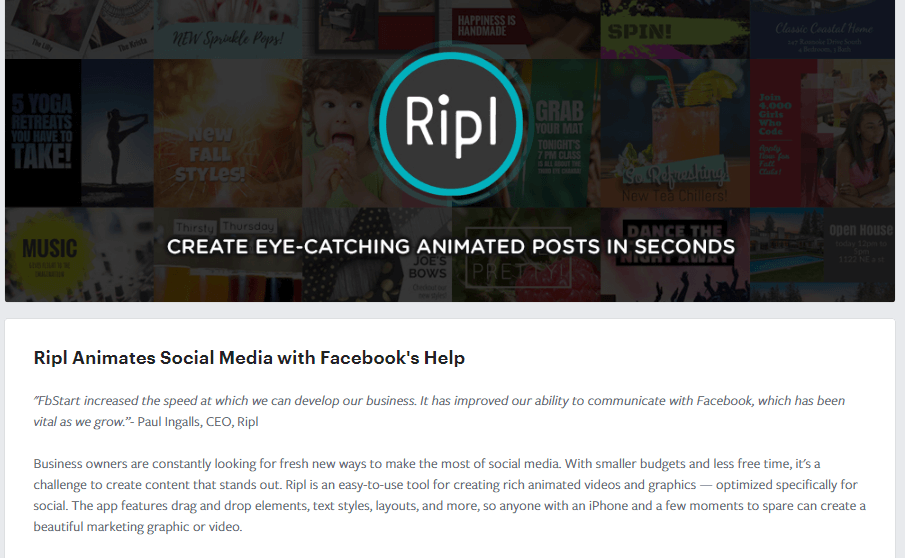
Figure 3: Facebook's API use-cases emphasize how customers like Ripl solve problems and bolster new business initiatives.
Each story describes the company's goals, the solutions used to meet those goals, offers qualitative outcomes, and the Facebook products used to achieve those outcomes.
An app gallery is another great way of showcasing how the real world is using your API. Not only are galleries aspirational by showing what's possible, but they can often double as app store-like marketplaces, thus providing developers a to way market their apps and generate revenue through the usage of your API (not to mention how increased consumption of those apps increases the consumption of the API which could result in increased revenue, depending on the API's business model). Some API providers generate additional revenue for themselves by underpinning such marketplaces with revenue sharing-based business models where, in exchange for helping the app developer to market its application, the API provider gets a cut of the business.
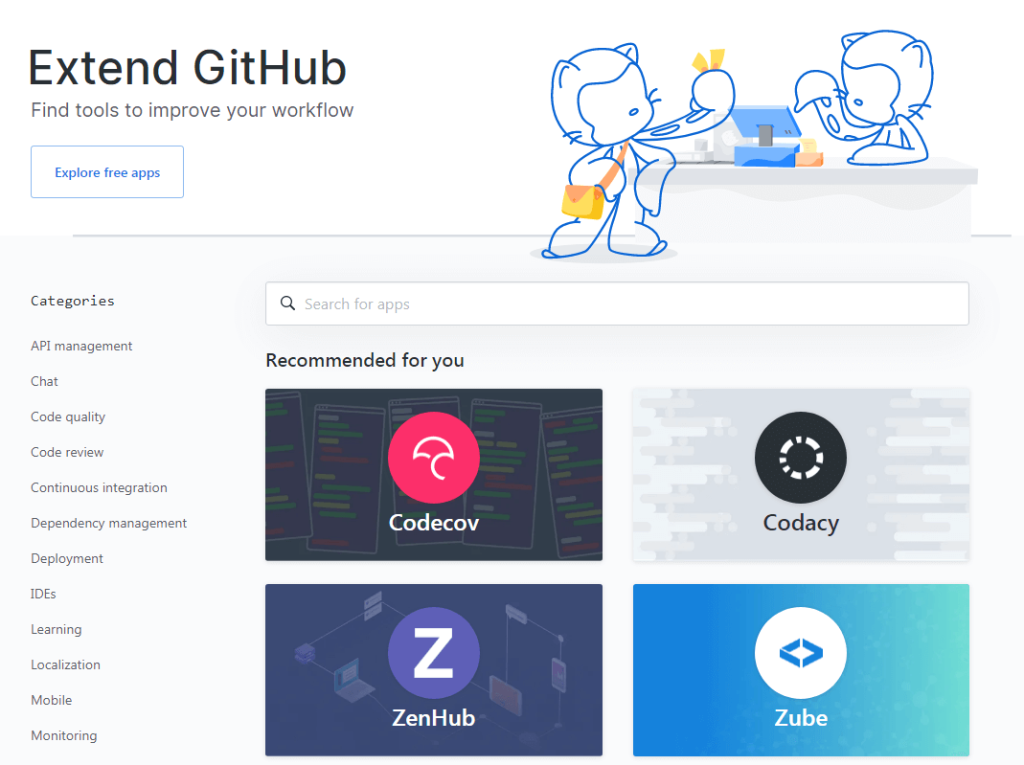
Figure 4: GitHub does a good job of having an active marketplace that offers a wide range of apps that integrate with its service. It's one of the reasons why, what started as a small hosting resource for developers, was acquired by Microsoft in 2018 for $7.5 billion.
What You Can Learn From GitHub's Marketplace Criteria
In order for a developer to have their application listed in GitHub's Marketplace, the app has to satisfy a list of requirements before GitHub's onboarding specialists will approve the listing. The guidelines fall into four main categories:
- User experience - Ensuring that apps meet minimum thresholds of users and installs, and that they are publicly available
- Brand and listing - Making sure that GitHub's brand standards are followed and the listing is of a certain quality
- Security - Ensuring that apps are secure and adhere to GitHub's security best practices
- Billing flows - Depending on whether an app is free or paid, it must allow for free trials, upgrading or downgrading a plan, and cancellation of a plan
These requirements may seem to create a high barrier for entry, but they offer the following benefits to both app developers and customers:
- By raising the barrier to entry, GitHub can guard against the marketplace being flooded with low-quality applications
- The guidelines, especially around security, will discourage a number of bad actors from submitting apps to the marketplace
- GitHub can ensure the consistency of their brand's representation by enforcing their brand standards
- Having these guidelines in place sends a signal to developers that the marketplace hosts quality applications and can be considered a viable place to do business.
Speaking of business models and marketplaces, another critical part of clearly presenting the UVP of your API involves a description of the business models it relies on, including specific pricing information. Make sure a visitor to your portal can quickly identify and understand the costs of consuming your API, and any limitations that go along with this, such as usage limits (maximum allowable API calls over a given period of time) and rate limits (maximum frequency of API calls). Across the API economy, there are numerous API monetization models from which to pick. Some are more direct than others. In other words, whereas some API business models are driven by the number of overall API calls being made (a direct form of monetization, sometimes referred to as a "coin-operated API"), others might allow an unlimited number of API calls in exchange for a subscription to an advanced tier of service. At last count, ProgrammableWeb observed and documented over 30 different API business models in use across the API economy.
So make certain your choice is informed by your overall business strategy. For example, if you use a model that charges developers directly for API calls, consider having a free tier of service that allows a restricted number of API calls at no charge. This way potential users can benefit from trying your API in a limited capacity, thereby setting their expectations for what the API can do should they decide to engage your offerings with a more robust tier of service. Furthermore, research indicates that your API consumers are three times more likely to eventually upgrade to a paid tier if you include a free tier as the starting point.
In conducting our research for this whitepaper, we were surprised by just how difficult it is to find providers who are upfront with their pricing. Many even hide that information behind a registration wall or a link requiring you to contact their sales team.

Figure 5: While businesses want to encourage or even demand that a prospect interact with a member of the sales team as soon as possible, requiring that additional click to learn crucial information (like price ranges or tiers) is enough friction to halt many decision-makers' progress through the customer purchase funnel. Ease of access to pricing information along with a free tier of API access will maximize the rate of converting visitors into customers (known as the "conversion rate").
Many others inexplicably bury this information without providing any clear road signs directing visitors to it. Of course, many APIs are free to use, only requiring that you register and get some form of an authorization credential. But even in these cases, the providers often do a poor job of communicating that the API is free.
AccuWeather, a weather media company, does a nice job by having a dedicated pricing page that's very easy to navigate to from the developer portal landing page . The basics of its pricing strategy are communicated through a table on the pricing page . In Figure 6, you can see that the pricing model has different tiers including a limited trial tier that is offered for free. This is called a freemium model and is a great way to get interested developers to try out your API with minimal investment.

Figure 6: AccuWeather's informative site assures users that the company's API pricing structure is designed to accommodate their success and growth without charging them for services they don't need or want.
As part of helping users understand both your company and its API, you also need to publish a clearly written developer or API Terms of Service that's easy to find within the portal. Too many providers only have a general Terms of Service (for their website) that either neglects to specify the terms for using the API or doesn't mention the API or platform at all. The music streaming company Spotify has published a Developer's Terms of Service that's very clear and easily found. The terms are specifically written for developers and clearly define the platform as "our developer tools accessible (e.g., APIs, SDKs, Widgets) and documentation described, on our Spotify Developer website ."
2. Help Developers To Start Working with the API Quickly
You've managed to convey the value of your API, described what it can do, and explained how it can solve a user's problems. If all has gone correctly, the potential user will want to try out the API. You need to be able to onboard developers to your APIs with as little friction as possible. This critical part of the developer experience (DX) is the so-called Time to Hello API; essentially the API version of Time To Hello World. Here the goal is to give your users the feeling of success quickly and with minimal effort on their part. If you can make your portal as self-serviceable as possible, your users' DX will be a much better one as their exploration of your API begins.
Several factors can accelerate and simplify the Time To Hello API, including:
- Having a self-service signup and registration process
- Provisioning the necessary API credentials (e.g., API key) as a part of that process
- Offering "Getting Started" guides for securely developing applications with your API
- In-depth tutorials built around sample use-cases
- Tooling, such as SDKs and code samples, both covering all of the relevant programming languages. For example, if the API is best consumed with mobile applications, then the SDKs and code samples should cover popular mobile platforms like iOS and Android, and the languages that serve them (e.g. Objective C, Swift, Java, and Kotlin)
Why API Keys are Important (It's not what you think)
API keys are not a well-understood subject. Many people wrongly assume an "API key" is a security mechanism because the phrase includes the word "key." From there, API providers often make two other assumptions. First, for API providers who feel as though API security is unnecessary because of the intended public nature of their API, that API keys are also unnecessary. Second, if they do feel the need for API security, then API keys are all they'll need to secure their APIs (the same way car keys are all you'll need to secure your car). So, while we strongly suggest that all API consumption involve the issuance of a unique (meaning specific to each developer) API key at the time of developer registration, it's critically important to understand that an API key alone is not enough to secure an API.
For API providers, API keys result in several benefits. From a security perspective, they often play a role in the automated generation of a security token at application runtime. From an API dashboard perspective, they serve as a unique developer indentifier, helping you to compile API usage statistics per developer and per application (data that you should always have regardless of the public or private nature of your API). API keys can also play a impotant role when you must revoke a developer's or application's access to your API.
For organizations that recognize the importance of API keys, we also strongly recommend that you not attempt to "roll your own" solution for managing API keys. API key management is typically a checklist item for most enterprise-grade API management solutions and we therefore suggest that API providers go with an off the shelf solution for API management instead of developing their own.
Onboarding
The key to successful onboarding is to eliminate any obstacle (either time or task) that stands between your API and potential developers. Avoid anything that complicates or slows their efforts to try your API. For this reason, your self-registration process should require as few steps as possible. NASA's API portal does a great job by requiring only a name and email on the API key request form. Once developers press submit, they're shown their API key immediately and given a sample API parameter that's prepopulated with their API key for cutting and pasting, either into the source code of an application or into a cURL command for calling NASA's API from a command line (see Figure 7, below).
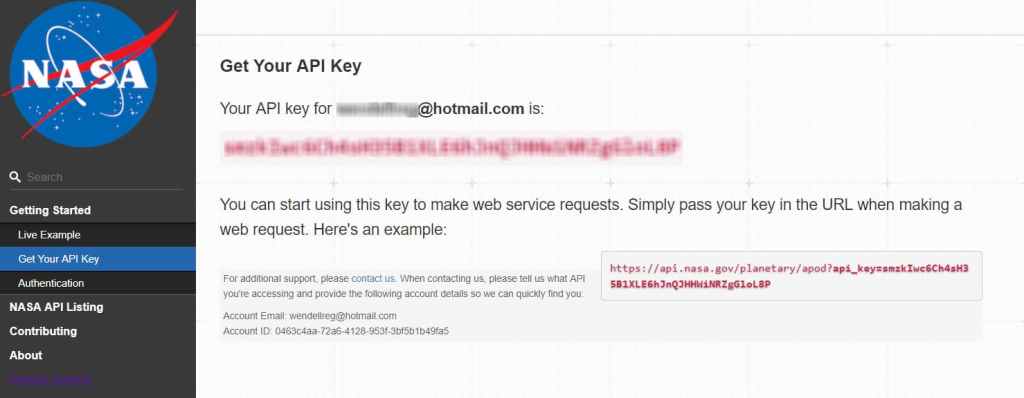
Figure 7: Onboarding with only the essentials, NASA's API portal asks the bare minimum and then immediately gets developers started.
Stripe, an online payment processing company, goes one step further by providing users with a test API key, so they can try the API in a non-production mode without ever having to log in or register.

Figure 8: Stripe opens its sandbox to decision-makers with a test API key that allows users to sample the API without having to register first.
Educational Content and Tutorials
Once developers register, most will naturally look for a Getting Started guide. Think of this part of your documentation as the launchpad. Such a guide not only helps take developers through the important steps needed to begin using the API, but it also acts as an assurance that they're doing things correctly. Peace of mind, even in this simple way, raises a customer's confidence that your products and services are the best choice. While the Getting Started guide should spell out the individual steps, it doesn't necessarily have to go into each step's gory details. The goal is to give the developer an end-to-end understanding of how best to work with your API, and how to do so in a reasonable amount of time (again, keeping Time to Hello API in mind). The guide provides crucial information but doesn't bog down the user with extraneous details. Then, you can link to other pages that go into more depth on particular topics.
At its most basic level, a Getting Started guide often includes:
- Instructions on creating an account
- Obtaining an API key
- Setting up authentication and authorization
- Making an API request (often referred to as "calling the API")
- Evaluating the response
As mentioned earlier, your guide should also cover common use cases for your API. Doing so might seem outside the mandate for sticking to essential information. But remember that the developer is still exploring and is open to learning new perspectives in addition to steps, facts, and procedures. GitHub, for example, does a good job of offering a basic introductory guide in addition to specific guides for tasks that are common to its API users.
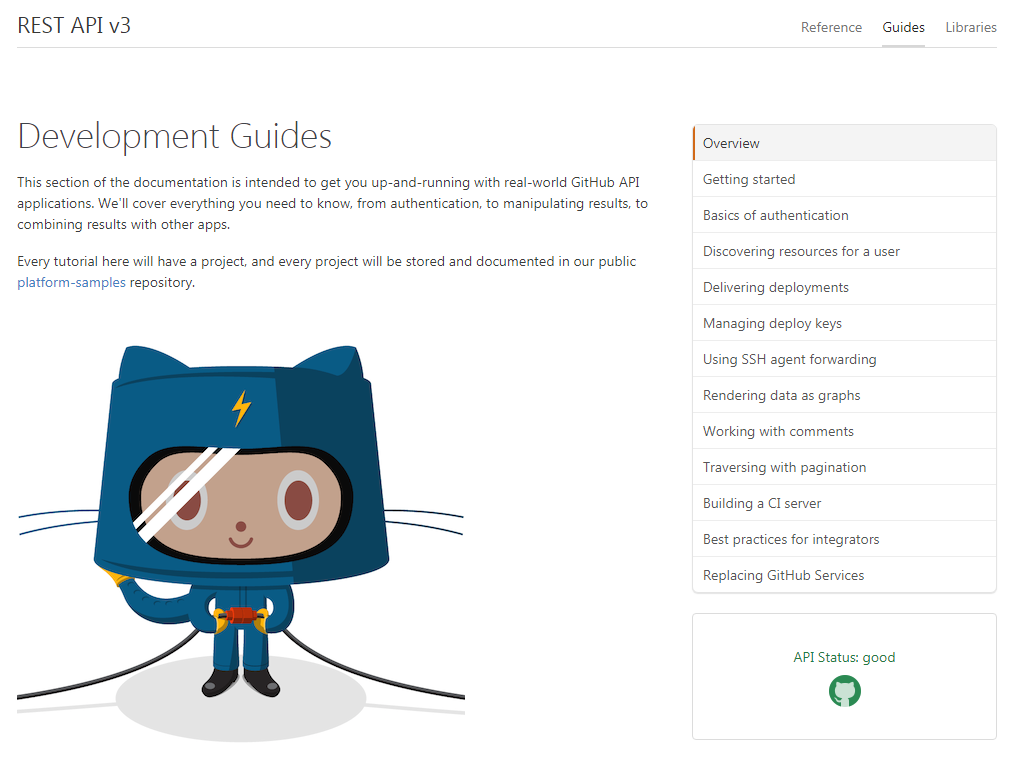
Figure 9: GitHub's Development Guides page rewards developers immediately by answering the initial question that's most frequently asked, "I want to roll up my sleeves and get started. How do I do that?"
GitHub also presents its users with Learning Lab, an interesting and innovative approach to Getting Started material for its API. Learning Lab is a bot-based educational environment that takes users through a series of immersive virtual "labs" in which they get to play an active role. Instead of a text or video tutorial, Learning Lab is an app that lets users participate while they're learning. We would love to see more providers using the opportunities offered by this type of educational material.
One piece of critical documentation that providers often forget is a guide that shows how to use an API securely. Developers need much more than a single section that describes the authorization and authentication workflow for your API(s). You need to present the challenges your users will meet when they're looking to develop secure code and you should stress the importance of security-first coding nevertheless. Clever , a developer of education system integration technology, makes sure to explain its security practices and offers security recommendations for each product. Why is a focus on security so important? According to a study by High Tech Bridge, a global provider of web and mobile Application Security Testing (AST) services, for mobile backends:
- 88% of API and web services used in the mobile backend contain exploitable vulnerabilities that allow access to sensitive or even confidential data;
- 69% of API and web services used in the mobile backend have insufficient anti-automation mechanisms or protections [e.g. web application firewalls (WAFs)] against common web attacks.
If users have a successful onboarding experience and receive a basic understanding of how to use your API, there's a much greater likelihood that they'll dive right into integrating it with their applications. At some point, they may run into a problem they can't solve by reviewing the API reference alone. This is when you need to have comprehensive tutorials available. Tutorials differ from guides by instructing developers on how to perform specific actions at a much greater level of detail. Remember, tutorials should solve user problems instead of showing off functionality. If you've been paying attention to the queries made by your user community, you'll see how they often have the same misunderstandings and troubles with similar tasks. These difficulties are the ideal candidates for in-depth tutorials.
Twilio , a communication tools company, offers a great set of tutorials for its APIs. Each tutorial takes users step-by-step through the process and offers a number of excellent features that are useful to anyone following along. Twilio provides its tutorials in multiple programming languages, and users can access each through a drop-down menu at the start of the individual page. As they proceed, the page displays the sample code in a persistent window on the right side of the screen. The code is specific to the SDK for the users' preferred language, and they're given the code for the two most recent versions of the SDK.
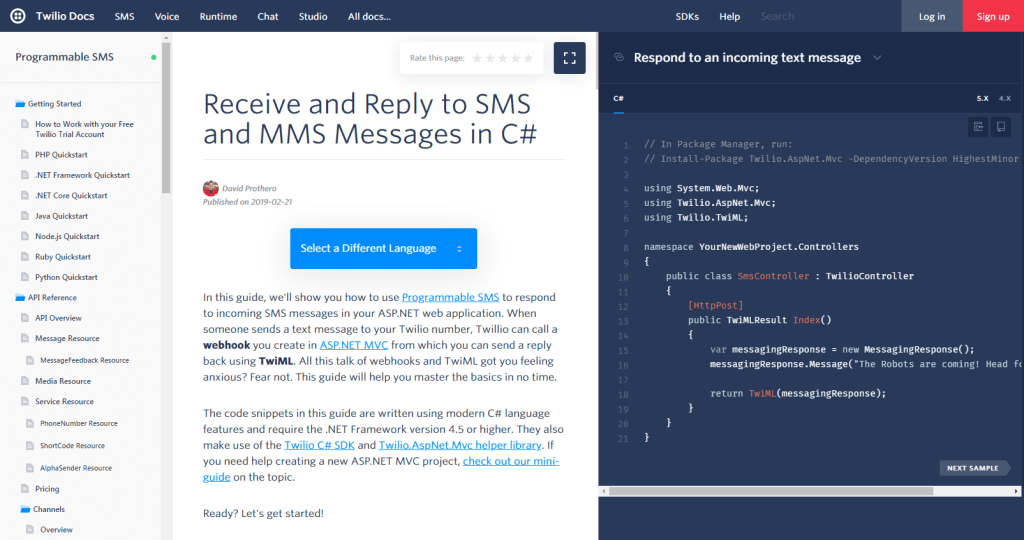
Figure 10: Twilio gives users everything they need at one time to speed and simplify learning, including instructions and sample code. Twilio even offers two tabs of sample code for two different versions of the API as shown in the screenshot, top right.
As users scroll through the tutorial's steps, the code in the right-hand pane changes automatically to keep relevant with the narrative in view (in the center pane). This very nice feature not only saves a click, but also ensures that the step they're viewing displays the proper code. The code window has two buttons: one that lets the users copy the entire block of code and the other (shown in the screenshot, top right) that opens the code sample in GitHub.
As for the content itself, the Twilio tutorials are thorough and include a ton of links for use as a glossary as well as information about any additional tools developers may need to finish their work.
Another great idea that we don't see often enough is the use of video tutorials. Along with providing an explanation of the steps involved, video allows users to sit at your side as you show them how to use the API. Kairos , a provider of a face recognition API, has an excellent (and brief) video tutorial that explains how users can make their first Kairos API request with Postman. (Postman is the leading graphical API query tool).
Tooling
An important part of making developers productive with your API is to meet them where they are in terms of technology and language choice. A good portal provides resources in the form of SDKs and sample code in languages that are appropriate for developers. Therefore, if the API is appropriate for mobile applications, you might want to offer SDKs for iOS (e.g., Objective-C and Swift) and Android (e.g., Java and Kotlin). But if the API is more appropriate for server-driven applications, then you should give them SDKs for server-side platforms, such as Python, Node.js, and PHP.
SDKs are sometimes referred to as "libraries", "clients", or "client tooling." Providing SDKs is a very important part of developer engagement because it lets developers work in the programming language they're most comfortable with and flattens their learning curve when they start to implement the API in their applications. The SDK simplifies working with APIs by abstracting cross-cutting concerns (such as authorization, authentication, logging, and data transfer), thereby improving developer productivity, especially when creating new applications.
Sample code can take two forms. The first is the code snippet. These snippets, which are easy to cut and paste into a developer's source code, are often sprinkled throughout the API reference. The second takes the form of a sample project that shows users how to complete a non-trivial task. Make sure the sample code is bug-free, because developers may actually use it in third-party implementations. Additionally, the code, replete with comments, should highlight any best practices that developers ought to follow when interacting with the API. In some cases, the sample code is offered as open-source through GitHub as Ping Identity has done (shown in Figure 11 below). By offering sample application code through a code repository like GitHub, developers can not only copy the code directly into their own code repositories, they can easily fork the code, or even improve it by submitting pull requests to the API provider.
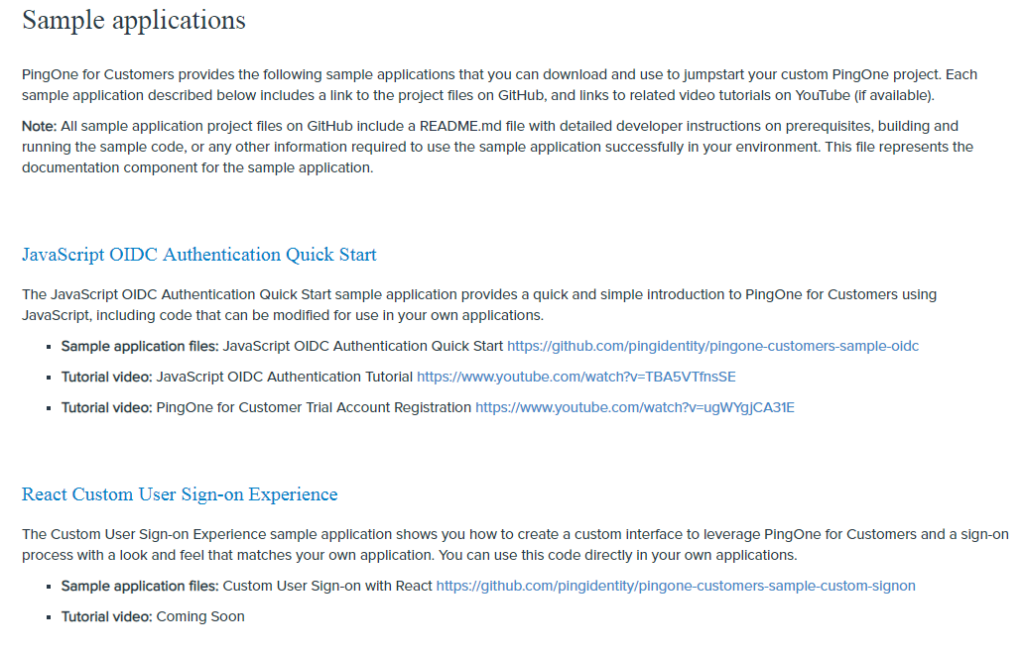
Figure 11: Ping Identity, a provider of secure digital identity solutions, includes sample code on GitHub that users can modify and use.
3. The Top-Notch API Reference
At the heart of any portal is the API reference, which helps users understand how to use the API. Once developers are comfortable using your API and have begun working with it, the reference is where they'll go when they run into a specific issue.
It's important that we make a distinction here between an API reference and API documentation. Pronovix has discussed some of the differences between the two and how, at times, the phrases are used interchangeably. For our purposes, an API reference is the set of detailed instructions that includes all the resources available through the API, any parameters and their values, detailed requests and expected responses, header formats, and error/success codes. Many portals go well beyond this list, but this is a minimum standard for having an acceptable reference. API documentation may include content such as getting started guides, links to tooling, and a discussion about API security. The API reference is a necessary subset of the API documentation.
The Basics
To make your API reference truly great, you'll need to meet a few criteria. To start, it is imperative to make the reference an online web page(s) as opposed to a PDF document that the user must download (a mistake that we see all the time). Most APIs will undergo changes during their lifetime and eventually a static document is nearly guaranteed to contain out-of-date information.
The reference needs to be complete and includes all of the resources that are available through the API. To go a step further, including a full description of what each resource does is a good practice. The bank BBVA does a great job of this on its API portal, providing detailed notes on each resource's function and what the associated HTTP verbs (POST, GET, PATCH) do when applied to those resources. This is a nice feature that allows users to understand exactly what to expect when working with any endpoint.
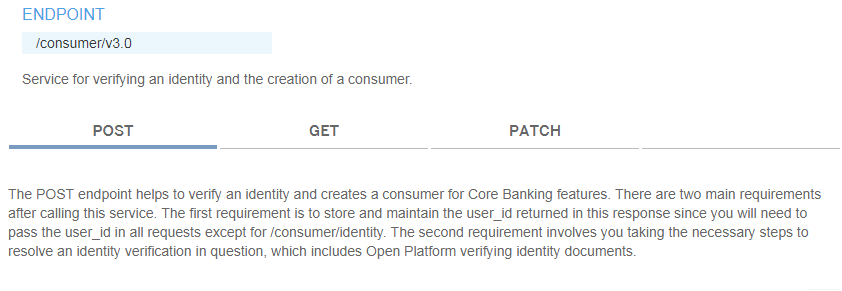
Figure 12: BBVA's reference documents never assume a user has a complete understanding of a resource, so the bank includes notes that explain them.
However, what continues to surprise us is a large number of API references that fail to include complete URLs (usable in cURL requests) in their content. Many, such as the BBVA example above, only show the relative resource. Others, such as Twitter , do a better job and show a complete resource URL.

Figure 13: Twitter's developer portal shows the complete URL for usage in API calls.
Let's take a moment to clarify the difference between endpoints and resources with regards to RESTful APIs. Many API references use the two terms synonymously which can lead to some confusion. The term endpoint is the base URL that developers use to address an API. In the Twitter example in Figure 13, the endpoint is https://api.twitter.com/1.1 (the base URL of version 1.1 of the Twitter API). Any call made to the API will have that endpoint as part of the request's full URL.
A resource is usually a collection of data, often represented by a noun, that can be acted upon by an API request. In Figure 13, the resource is /search/tweets.json where the API will return a collection of tweets that match any additional request parameters.
Using the cURL command line utility to call Twitter’s resource for searching tweets, the full syntax of an API call including the HTTP Verb (GET), the API’s base URL, the path to the resource for searching tweets, and any necessary parameters (e.g., API keys and security tokens needed to access the API) might look something like this (according to Twitter’s API reference):
$ curl --request GET
 --url 'https://api.twitter.com/1.1/search/tweets.json?q=from%3Atwitterdev&result_type=mixed&count=2'
 --header 'authorization: OAuth oauth_consumer_key="consumer-key-for-app",
 oauth_nonce="generated-nonce", oauth_signature="generated-signature",
 oauth_signature_method="HMAC-SHA1", oauth_timestamp="generated-timestamp",
 oauth_token="access-token-for-authed-user", oauth_version="1.0"'
Stripe , an online payment processing company, provides a best-in-class development experience by also showing the complete endpoint and resource URL as part of a full cURL call, and it also includes an API key. cURL is a language-independent way of calling an API directly from the command line interface (CLI) of an operating system like Linux. In addition to including sample API calls in the various programming languages that are best suited to the API, great API portals should always show what an API call looks like in the form of a cURL command. As shown in Stripe's developer portal, and the portals of other API providers, full cURL commands can be copied and pasted directly into a CLI and executed from there. With some API providers, you may have to change the API key and other parameters to the ones that were assigned to you. With Stripe, however, as presented in Figure 14, even if the user isn't logged in, the site automatically generates a working test key.

Figure 14: Stripe demonstrates an API call that uses a complete cURL request.
Let's take a look at another important, frequent omission from many API reference materials. As part of an API request, the header often includes authorization parameters that are used for all endpoints. Because of this, most providers will document header parameters in a separate section that covers authorization requirements. This seperate placement is a missed opportunity to provide a better DX by listing the header parameters on each resource. Who does it right? As shown in Figure 15 below, Postman is a leader in this criteria by showing full header parameters with each sample API call that's listed in the reference.

Figure 15: The Postman reference contains some of the most detailed requests and responses for each resource that we've seen, including full cURL calls and parameters for both the header and the endpoint.
A good reference also describes all of the possible parameters for calling the API, to what resources those parameters are applicable, and whether any of them are required or not (to make a successful API call). These often include the parameter name, its type (string, integer, object, etc.), and a short description of the expected contents or a range of possible values (as shown in Figure 16 below).

Figure 16: GitHub's API reference does a very good job presenting the complete set of parameters by including the parameter name, type, and description.
Even better, as shown in the last row of the description column in Figure 16 above, if GitHub has deprecated certain parameters (which invariably happens with any API), the documentation of those parameters are marked as such with instructions on which parameter to use in its place. However, there is a caveat to this presentation. As there is no globally accepted definition for the term "deprecate" across the API economy, it's not clear whether the deprecated parameter ("line") has been deactivated to the point that it won't work if used (which might cause older applications to break), or if GitHub is suggesting that developers use the newer "position" parameter because the line parameter will lead to application dysfunction at some point in the future. Wherever possible, using words and phrases that are unmistakable in their meaning (eg: "deactivated" and "scheduled for deactivation on YYYY/MM/DD") is strongly encouraged.
The final piece required for a minimally viable reference document is a robust set of status codes that indicate the degree to which an API call succeeded or failed. Developers like to see that an API has a status response code framework and that it's explained within the reference. In the case of Web-based APIs that depend on HTTP, merely including some baked-in response codes due to HTTP being the underlying protocol is simply not enough. You must go to the trouble of designing and implementing a response code architecture. For example, in addition to an error glossary, Mailchimp does a simple, but great job with a page that explains how error handling works.
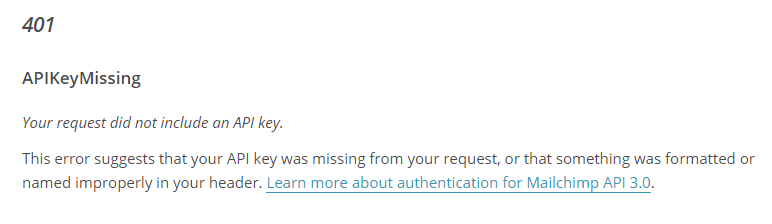
Figure 17: An example of one of Mailchimp's error handling explanations, which is a necessary addition to any API reference.
Mailchimp's glossary goes beyond listing the status code with a generic response to include details specific to the particular success or error. As an extra step, the company also explains a common reason for the error. If we look at error code 401 - APIKeyMissing, the glossary explains that a developer may have forgotten an API key from the request or formatted something improperly in the header. Then it links to more information on authenticating with the API. This makes for a very readable set of error codes that naturally leads developers to a solution.
Beyond the Basics
Having the basics in place means your reference is usable and satisfies the needs of most developers. Next, we list some criteria that will further improve your DX and even delight them. You need to show that using the reference adds great value to their consumption of the API while increasing their confidence in you as a reliable API provider.
One very useful feature of an API reference is when you present it as one page. This may seem solely like an aesthetic concern (and it works against the design principles for many other Web page types), but it has the practical advantage of making the reference fully searchable with a browser's built-in page-search functionality. A common presentation for a single-page reference is a three-column design. In this design, you'll show navigation links to the API's various resources in the left column (sometimes referred to as the "left-hand nav"), show the details for each resource in the middle column, and the right column shows example requests and responses, often with tabs for various languages. This is an elegant way to structure a reference that was pioneered by TripIt with what's known as the Slate design, an open source static documentation tool that allows you to write your API reference by hand using markdown .
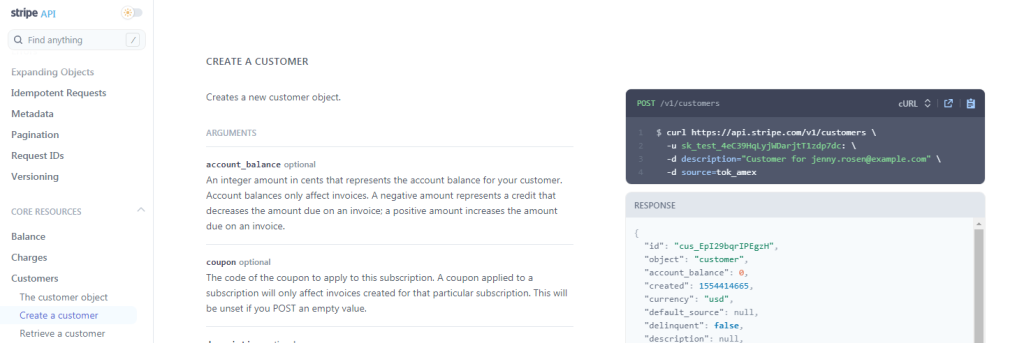
Figure 18: Here we see an example of the Slate-inspired three-column design on Stripe's reference page. As mentioned above, this makes the entire reference easily searchable, contributing to how Stripe's DX truly shines.
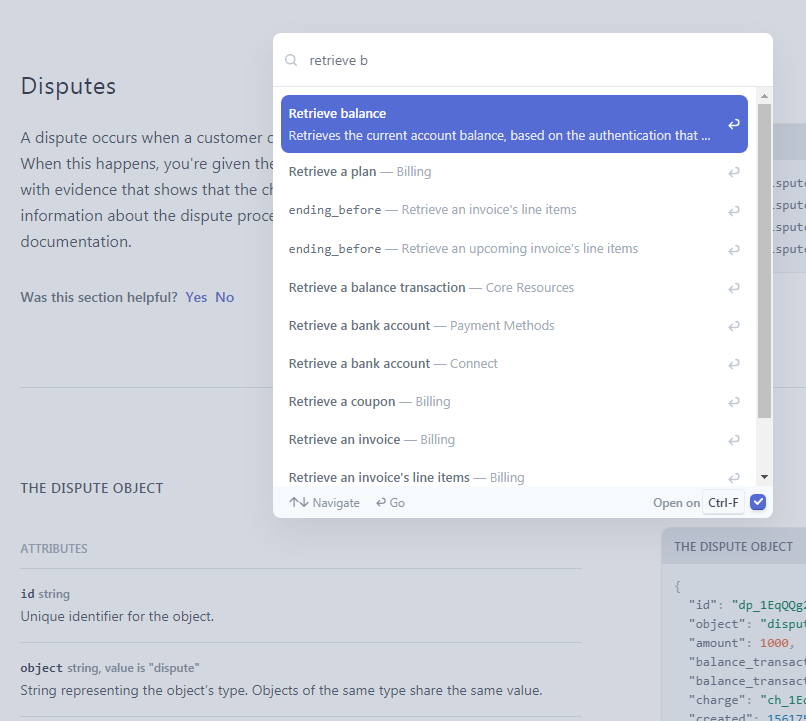
Figure 19: While browsing Stripe's API reference documentation, the Ctrl-F/Cmd-F keystrokes present a search box for querying the entire reference and auto-completes entries with suggestions based on what the user starts to type. If the user prefers the browser's native search, then the user can type Ctrl-F/Cmd-F once more. This feature is a huge help when searching and the exact name of the method is unknown.
Sometimes, it's the little pleasantries that add a nice touch to the DX. When developers are browsing an API reference with their web browser, they'll often have their development environment (eg: Eclipse, Sublime, Atom, etc.) or a command line open alongside it in another window. Therefore, having a button that lets them copy a snippet of code from the reference into their own coding environment is an important timesaver that seems unimportant at first, but can actually add up over time. As hard as it is to believe, we've seen developer portals with screenshots of code that cannot be copied to the clipboard, let alone pasted into another application.

Figure 20: In this API reference example from cloud storage company Box, the user interface offers sample API calls for cURL, Java, C# (.NET), Node.js and Python. In each case, one click of the Copy button is all it takes to copy the code to the developer's clipboard.
A great feature that's both helpful and adds a personal touch is when a portal can recognize a registered user and dynamically adjust the reference accordingly. ProgrammableWeb has covered how weather and climate data company PlanetOS does this by adding the user's personal API key anywhere it's required as a parameter into the sample API calls found in its reference. Clearbit , provider of a marketing data engine, also does this, as shown in Figure 21. This is a handy function that quickly readies sample calls for cutting and pasting.

Figure 21: Clearbit recognizes registered users and tailors its reference to them. In this partial screenshot, we've obfuscated the personalized API key.
Navigating Different API Versions
Some providers will run multiple versions of their API concurrently. In these cases, having a version selector from within the reference page is a great idea because users can toggle back and forth easily to better understand the technical differences between the versions. Cloud-based scheduling platform Humanity 's reference is one example of this.

Figure 22a: Users can select the version of Humanity's API they need to research.
Although we find Amazon's approach to be less appealing than an actual version navigator, a regular text link that points to the "legacy APIs" (as shown in the screenshot below) is better than nothing at all.
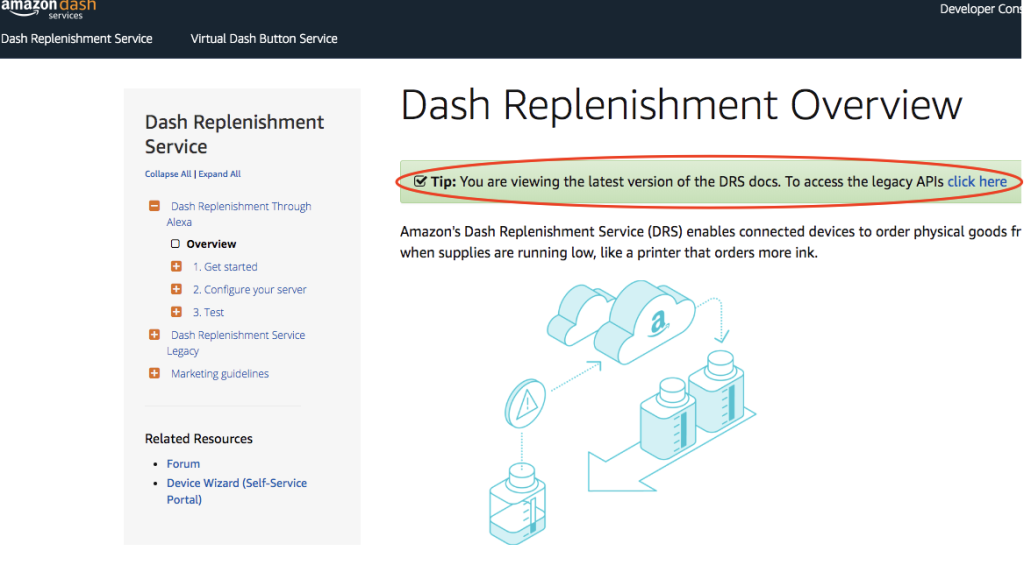
Figure 22b: Although Amazon doesn't have a version navigator for its Dash Replenishment APIs, it does offer a text link that allows developers to explore the older "legacy" version of the API. Similarly, the legacy version has a text link that points back to the "new API".
Discord , the maker of a communications app for gamers, handles versioning in a slightly different way than most API providers. If the version number is omitted from the request URL, the portal routes the request to the most current version. This is a nice touch to document in your API's reference and to include in your API's functionality. But, be forewarned; while Discord is very clever in what it has done, it requires some advanced thinking when it comes to designing APIs in a way that new versions are backwards compatible with their predecessors.
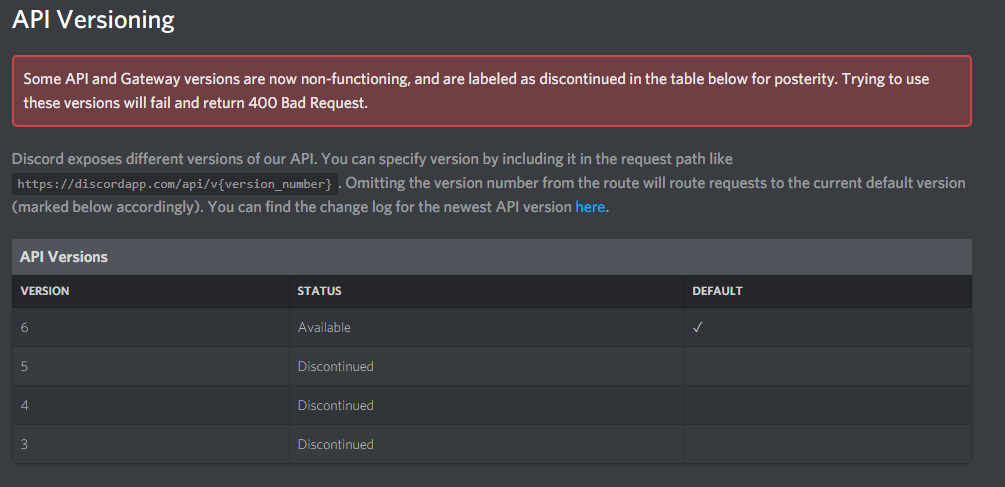
Figure 23: Discord's reference offers versions for older APIs, but defaults to the current one.
A great benefit for users is an easily accessible API description in your reference (one that complies with one of the several open standard API description specifications such as the OpenAPI Specification aka OAS or RAML ). An API description of this sort lets you describe your API in detail while also making it machine-consumable by other members of your ecosystem. This not only helps automate API-related processes (eg: auto-generating documentation, API test harnesses, client tooling, etc.) for you as the API provider, it lets API consumers, both humans and machines, keep up to date with any changes introduced into the API (provided you keep your descriptions up to date).
In the split screen below (Figure 24), we see two examples of downloadable descriptions files: one from Puppet Forge , a modules repository for Puppet IT automation software, and the other from FYB bitcoin exchange . Whereas Puppet Forge uses OAS to create machine and human-readable descriptions of its APIs, the API Blueprint description specification is FYB's choice. The choice of description format is a matter of personal taste (OAS is the most popular) — but what matters most is that both providers have chosen to include an easily located description that adheres to a standard description specification as a part of their API reference.

Figure 24: Puppet Forge (left) places its API description prominently on its reference page. FYB (right) also offers a download link to retrieve an API Blueprint-based description.
An API is bound to undergo changes over its lifetime, and these can include the replacement or elimination of resources and parameters; an act which many in the API economy refer to as deprecation. As the U.S. Energy Information Agency's (EIA) API has evolved over time, the deprecation of certain fields have been reflected in the sample output that the agency includes in its API reference. This is a great visual signal to developers as to the material changes from one version of an API to the next. However, the EIA could have gone one step further to indicate when exactly (ie: with which new version number, or on what date) those fields were deprecated. Even so, it's a nice touch that we rarely see.
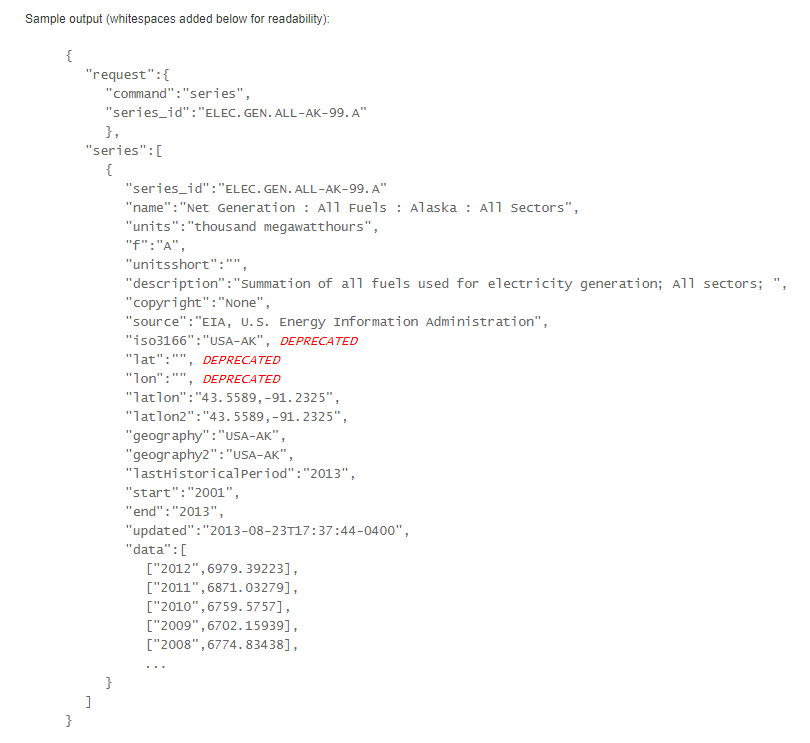
Figure 25: To help developers understand how a current API version may differ from its predecessor, the EIA clearly labels deprecated items.
Let's now turn to another example. Postman Collections are a group of pre-built API requests that are meant to be run in a specific sequence. Developers use these collections within the Postman client to demonstrate common use cases, such as authentication, cookies, customizing headers, etc. These collections can also simplify the process of testing and implementing APIs, especially for developers that are new to them.
In the context of an API reference, Postman Collections accomplish a couple of things. First, they allow you to build a simple use case for your API that demonstrates to developers how it can be used in the real world. Second, if you are unable to include interactivity into your API reference, Postman Collections offer you a simple way to let developers interact with your API outside of your portal.
Figure 26 below is an example from the Kentico Cloud API reference . A simple click of the Run in Postman button will open the collection in a developer's Postman client.
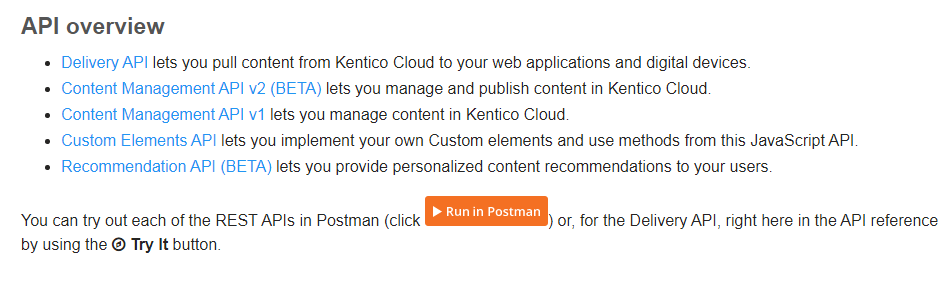
Figure 26: Below is an example from the Kentico Cloud API reference. A simple click of the Run in Postman button will open the collection in a developer's Postman client.
Interactivity
One of the most important features that you can add to a portal is the ability for the developer to interactively experiment with the API. Ideally, this would take place within the API reference. But it can also happen as an extension of the overall developer portal in the form of a standalone console, explorer, playground, or sandbox. No matter how you implement it, interactivity adds value to users of all levels by demonstrating the API's actual behaviors, thus increasing their understanding of it.
The terminology can sometimes be confusing, so here are a few definitions:
- Consoles: A console provides users with a way to interact with the API so they can explore various resources, sometimes using live data. A console may allow them to compose requests with various optional parameters, view the server's responses, and perhaps export the corresponding cURL commands. Often called API explorers or playgrounds, the terms are used somewhat interchangeably by providers. Figure 28 below shows how Google has embedded a console into the third column of its API reference for the YouTube Data API
- Sandboxes: An API Sandbox is a protected environment where API consumers can run queries against sample data in a way that mimics the characteristics of the production environment. By doing this they receive realistic responses for APIs that reflect real system behavior. Uber's developers site provides a good example
- Playgrounds: As mentioned above, most providers use the terms playground, explorer and console interchangeably. Google is an example of a provider that offers a playground for a specific use case. The Google OAuth 2.0 playground is a web based application that lets users interactively play with various Google APIs to understand how they work. In order to make use of the APIs, OAuth based authentication is required and the playground helps developers to better understand Google's authentication workflow
The YouTube Data API, previously covered by ProgrammableWeb, offers a good example of how an API provider can embed an interactive console directly into its API reference. Using the three-column layout discussed above, the right column is used to display the console, while the middle column contains the reference details for each resource, including the potential request and response parameters.
The console lets users play with the parameter values and see what the ensuing API request and response looks like. Because it uses live data, users are asked to authorize with OAuth and provide an API key.
This console integration has a couple of nice features worth highlighting. The first is how Google supplies a table of common use cases for the resource. When the user selects one of the predetermined use cases, sample parameter values are automatically loaded into the console, quickly giving the user a feel for how the API works.
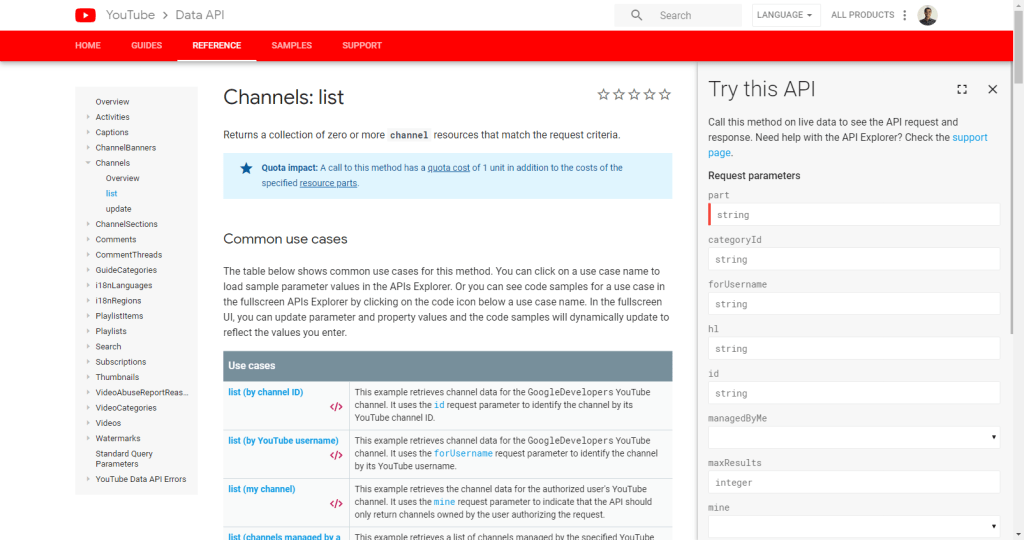
Figure 27: The YouTube API portal carefully and extensively defines common use cases within the console.
The console can also be toggled into a fullscreen UI, so the developer has a better view of the request and response payloads, a button to copy the sample request, and the ability to see the corresponding source code in a few different languages.
While having a console integrated directly into the reference provides huge value to portal users, this isn't the only way to implement one. Many API providers choose to have a standalone console where the user can experiment with the API. This offers the advantages we mentioned with the YouTube console UI (a more complete view of request/response payloads, a button to copy the request, and the ability to see the request code in various languages). Keep in mind that when offering a separate console be sure to link to it in a meaningful way from your API reference and vice versa. Look at how application performance management company New Relic's reference does this:
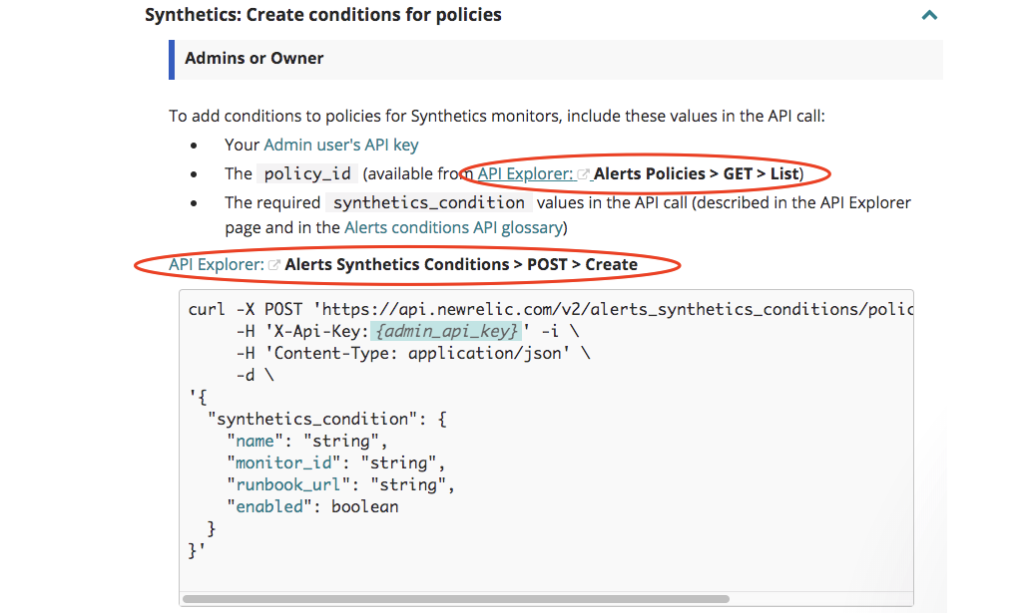
Figure 28: Note how, from within its API reference, New Relic has contextual links that not only take the developer to its API Explorer, it preloads the explorer with the relevant API call (see figure 29, below).
Within the reference, each resource has a link that opens the console (dubbed the API Explorer by New Relic) with many of the required parameters preloaded. This saves the user from toggling back and forth between tabs and having to fill in the necessary parameters.
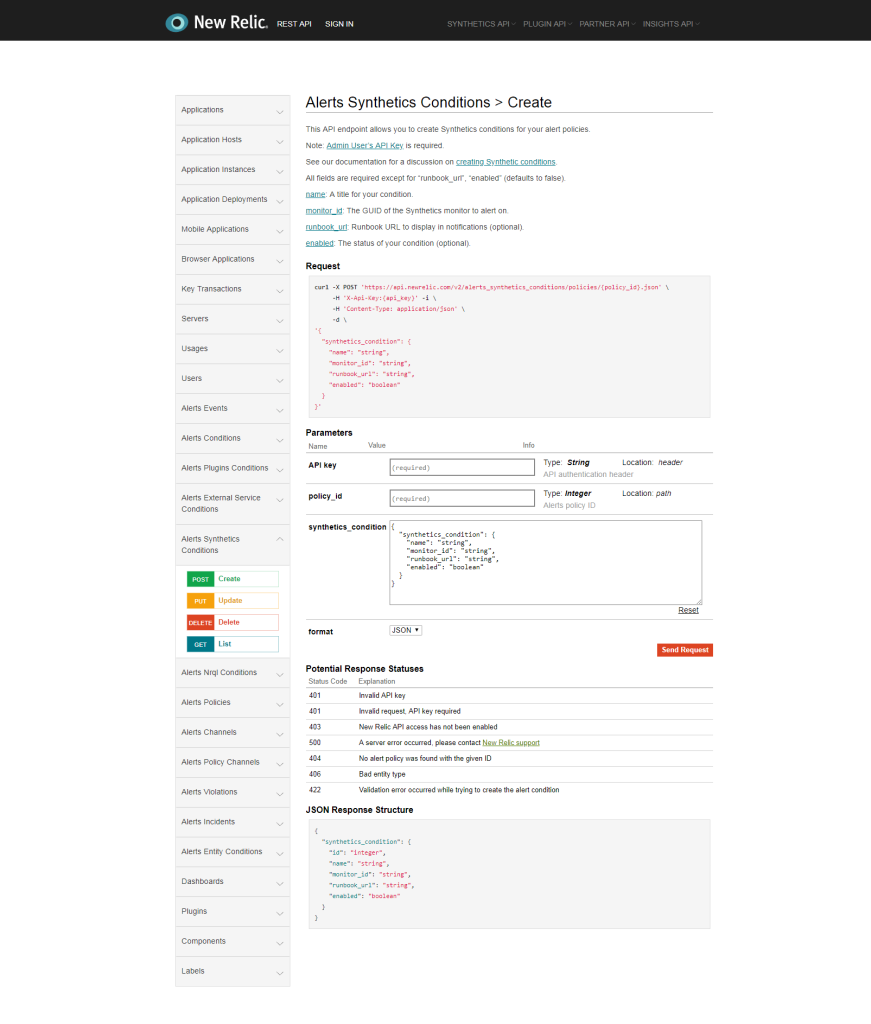
Figure 29: New Relic's console, already pre-populated with an API call based on the contextual link the developer clicked from within the API reference.
Uber's sandbox "provides development endpoints for testing the functionality of an application without making calls to the production Uber platform. All requests made to the sandbox environment will be ephemeral." In the sandbox environment, users make calls to the sandbox's base endpoint, which differs from the production endpoint. Users get the advantage of a safe application development and testing environment without harming their live accounts or impacting the provider's production service.

Figure 30: When it comes to APIs, a sandbox is where the developer can go play with an API without impacting production data. It's not a physical box however. As shown with Uber's sandbox, it's simply a non-production endpoint that responds as though real transactions are taking place (even though they aren't).
4. Establish Trust
From the moment visitors come to an API provider's portal to begin their discovery process, the portal is sending out signals about the trustworthiness of the API and its provider. These signals, both tangible and intangible, often work in conjunction with an API portal's ability to educate users and help them feel that they've made the best choice.
Users visiting an API portal are likely to be in one of three stages of their API journey, and they probably have questions when working at any of those stages:
- Discovery, which is the stage where users have a business problem and are looking to learn about you, what your API does, and how can it help solve their problems and how much it costs
- Where users, having decided your API can address their needs, are ready to start, and now need to understand the patterns and best practices that will help them succeed with your API
- When developers who are consuming and building with the API have run into difficulties and now need to understand how to properly call the API to get the results they're looking for
You need to ensure the content presented on the site helps users go through your DX, while the site architecture acts as a road map for users to find answers to their questions.
We've discussed why having a clear UVP on the landing page is important, and how this addresses the first set of questions from the discovery stage. But the landing page can't do it all alone. Think about the navigation. Do the menus intuitively point users to the location that answers their questions? In addition to menus, is there text with Calls to Action (CTAs) on the landing page to guide them?
Dropbox was highlighted earlier in our discussion of landing pages, but it also does a great job of presenting users with very simple, clear navigation and, as shown in figure 20 below, a set of text-based CTAs. Note that the text promises answers to the user's common questions, which we've already mentioned.
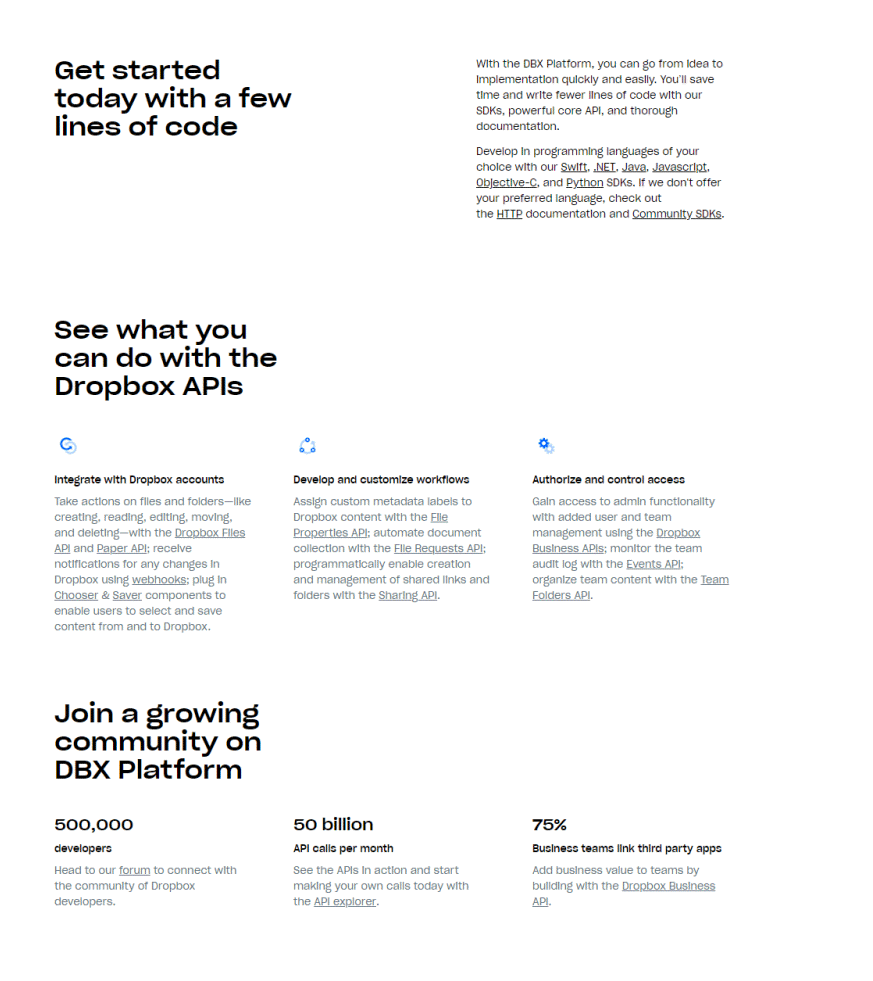
Figure 32: Dropbox sprinkles a number of CTAs throughout its landing page.
For users wanting to get started quickly, Dropbox has numerous links to its own SDKs as well as to those provided by its developer community. Developers wanting to dive right into working with the API can click any of the links to various API resources or the API explorer. And users looking to connect with the developer community can head straight to the online forum that Dropbox runs.
Transparency, Trust and Proactive Developer Communications
Being upfront with your API's status and providing a standing record of any changes you've made or that you plan on making are forms of transparency that build trust. GitHub's portal does an impressive job of this by dedicating the bottom quarter of the portal's home page to a record of the latest updates to the API. Developers can also subscribe to be notified of updates through email. Facebook offers a great changelog that not only lists changes to the API separated by version but also features a section that identifies which of those changes will cause existing integrations with previous versions of the API to break (often referred to in the API economy as "breaking changes"). Another cool touch is the table that lists when each version of the API was introduced and its expected end-of-life date.
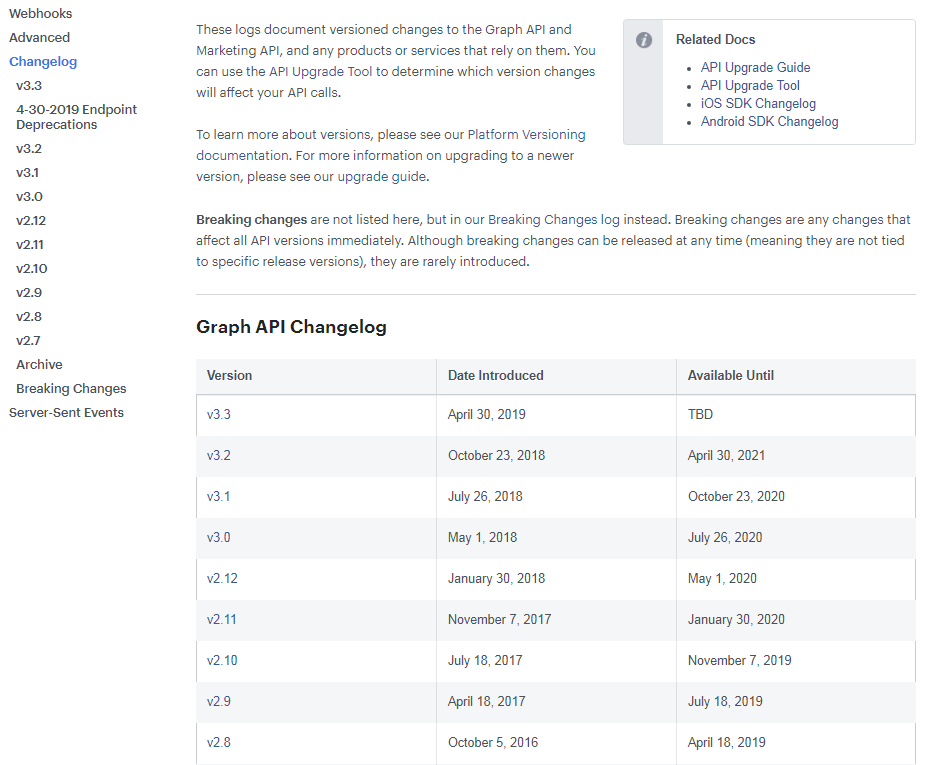
Figure 33: Facebook provides a valuable changelog page like this one for its Graph API. The page reflects the API's different versions, lists which changes break integrations, and also links to upgrade tools.
An API monitor or dashboard helps users by alerting them to any issues the API may be having. For example, this can help developers when they're troubleshooting issues because the alert will tell them that a problem actually originated with the API instead of with their code. Mailchimp has a server status page that shows the last seven days' worth of uptime of their 40+ servers. The company also runs a separate Twitter account that tweets the status of the Mailchimp service and embeds the most recent of those tweets alongside the status dashboard in the Mailchimp developer portal. Another good example is Stripe's dashboard, which includes a very visual presentation of its various services' performance over the last 90 days.
Where Are You and Your API Going?
A dedicated roadmap is an excellent way for you to communicate plans about your API. It keeps developers in the know regarding what features are in the works and notifies them of any changes that might affect their integrations. This gives developers a nice long runway to adjust to your roadmap, especially if it involves any breaking changes to the API. As mentioned earlier, breaking changes are changes to the API's technical contract that could crash or "break" existing applications that consume the API. Collaboration hub platform provider Slack presents a nice roadmap in the form of a Trello board . This roadmap shows the platform's upcoming features listed as app user experience improvements and API updates. The GitHub roadmap also features a Trello-like board that is organized by quarter. The cards can be filtered in a number of ways including by label, author and milestone. Clicking on any card brings up a summary of the issue, its intended outcome and how it is envisioned to work. This is a welcome level of detail missing from most portals.
We discussed the Terms of Service (ToS) earlier, but it also plays a part in establishing trust with potential users. Having a clear and easily located ToS shows users that you have nothing to hide and it helps them understand what to expect from their relationship with you while at the same time asserting what behavior is expected of developers (and yes, developers should always play by the rules).
Developer Engagement
A final and very important piece in establishing trust with users is for you to display an understanding of developer relations and outreach. There are numerous ways to achieve this from devoting resources to maintaining active developer forums, producing blog content to keep developers up to date on your API, and meeting your audience where they "hang out," through events and webinars. Each of these pieces helps to build an active and engaged ecosystem that serves as proof points that drive interest in your API. This gives users the impression that both the API and your business will be around for the long term.
GitHub's API developer forums involve GitHub's community manager, moderators, and members of the developer community answering questions, and they are very engaged. This serves as a proof point when it comes to GitHub's commitment to its API as a product. Likewise, when developers see a community that's actively engaged with an API provider, it can serve as evidence that the API is both well-established and well-supported.
Amazon Web Services (AWS) blog Is hard to top as a model for an active developer blog. It's updated several times a week by a team of developers and offers news, product updates, tutorials, training webinars, and more.
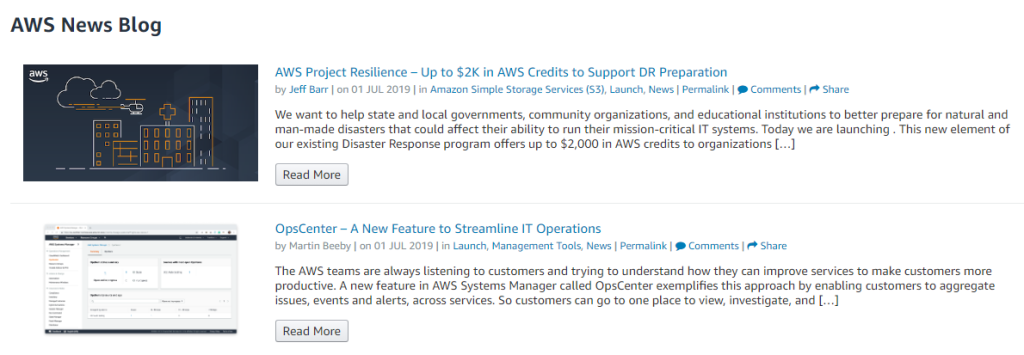
Figure 34: The AWS blog is known for frequent updates of useful content that engages the reader.
In addition to its blog, AWS also has a landing page that lists its past events and training webinars with the ability to access their recordings in an on-demand fashion. Beyond offering great content to the developer, a page like this shows a provider's commitment to connecting with its audience and bringing its developer community together. The AWS team also notifies its developer community (the developers that are registered to use its APIs plus other developers who have signed up for other Amazon-related events and materials) of upcoming events and webinars via email.
5. Support
Eventually, your users will be comfortable using your API and will begin to develop their apps. In the beginning, you can expect them to refer to the API reference on a regular basis. But along the way, they're bound to need help with their niche problems that are not addressed by your portal (or for some reason, cannot be found). This is where your portal should aspire to provide two types of support — that which is provided by your team, and that which is provided by the community.
Team Support
From an overall standpoint, the Google Maps platform support page is one of the best around.
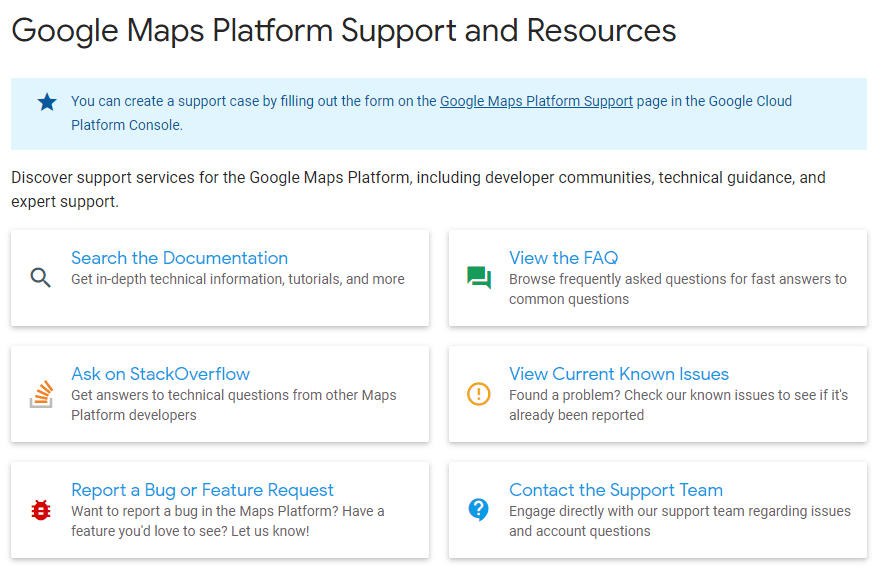
Figure 35. Google Maps Platform Support offers developers a comprehensive resource.
The Google Maps support page links to numerous support channels (including a detailed FAQ ) and to nearly 20 topics on StackOverflow.com (not owned or run by Google) covering the various APIs within Google's platform. Users can report bugs or request features, and they can contact the support team directly. Google is not the only API provider that makes use of the forums on StackOverflow (often called just "Stack" by developers). StackOverflow is one of the largest, if not the largest, independent developer communities on the Web. By meeting developers where they already are, API providers like Google make it easier for those developers to engage with them.
A nice feature on the Google Maps section for contacting support is an estimate of the expected response times, based on the severity level of the issue. Google Maps also does a great job of listing the various Google groups a user can join to stay informed of any updates to the platform. An example would be google-maps-api-tech-notify, which is the home for all technical updates to Google Maps APIs and web services (receiving ~ten messages per year).
Earlier we touched on how blogs can help build trust, but they're also a good way to provide additional support by publishing tutorials. One company that's mastered using its blog as a user resource is Clarifai, a visual recognition AI company. The Clarifai blog shows us how to use a blog for support by having a section dedicated to API tutorials.
The use of an online chat widget is another way for an API provider to have its team offer real-time support to users. Some providers will have the chat widget staffed by a human while others make use of a chatbot. Clarifai, a visual recognition AI company, does both.

Figure 36: Clarifai support teams with an AI support bot dubbed Clairbot.
Even some of the most well-known API providers make use of off-site channels to offer support to their users. Square uses its developer Twitter account to frequently make announcements both big and small, link to articles and tutorials about the API and even show some personality. Square also invites developers to join its Slack channel where they can connect with other developers in the Square community.
One implementation of Slack we'd like to see is for providers to allow access to the community's Slack channel directly from the developer portal user interface. This can be through a Slack button that would open the Slack channel via a widget when clicked. We haven't seen this on an API portal yet (let us know if you have seen one). But, it has been implemented in GraphQL Editor . The figure below shows this in action.
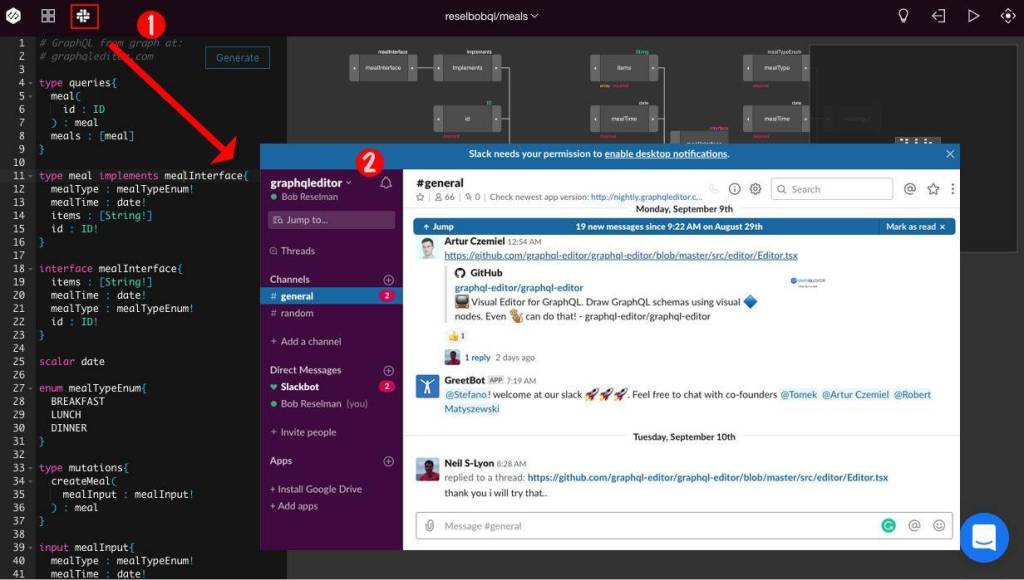
Figure 37: Clicking the icon on the upper left (1) will take users to the GraphQL Editor Slack channel web page (2).
One way of offering passive support that is useful to API consumers and helps make the portal more of a self-service offering is to have an analytics page or pages where users can track their usage of the API.
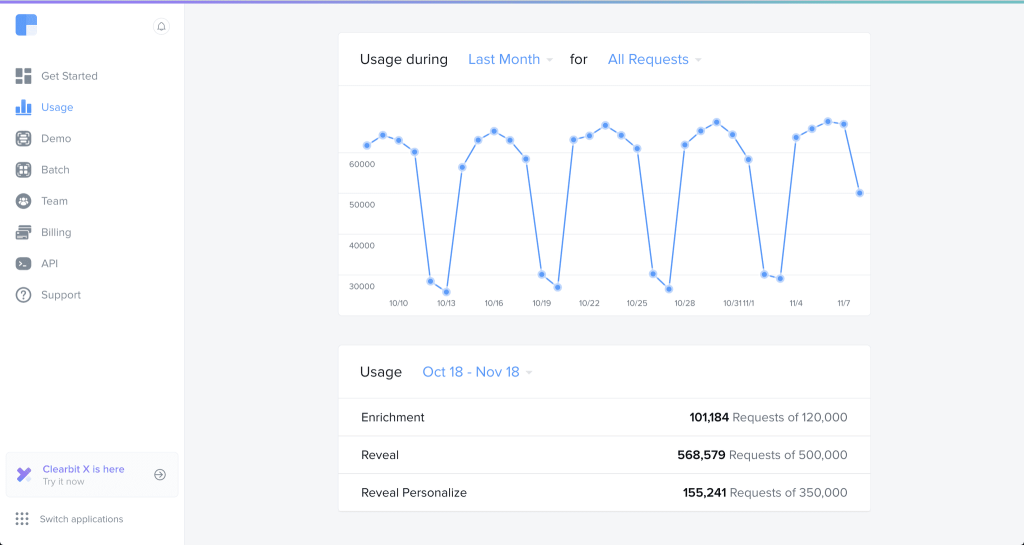
Figure 38: Clearbit has a user dashboard where API usage over the various time periods is measured.
This is a handy way to let developers know if they're approaching their monthly limit of calls. The dashboard also has a tab where users can view their billing information. All of these touches mean users can easily find the information they need in one place.
Community Support
API portals also serve as a way to bring the developer community together to pool experiences. Through this central support, area members can offer each other assistance for any common issues that arise. The most common method seen in portals is the community forum. GitHub's API Development and Support Forum is a very active forum featuring on average 30 threads per week. Many of these threads contain responses from members of the community that don't work for GitHub thereby increasing the number of avenues developers have for getting help outside of GitHub's own staff.
Facebook has a system in place where community members can report any bugs they encounter. Here, users can see if a bug they're dealing with has been reported and whether Facebook is working on it.
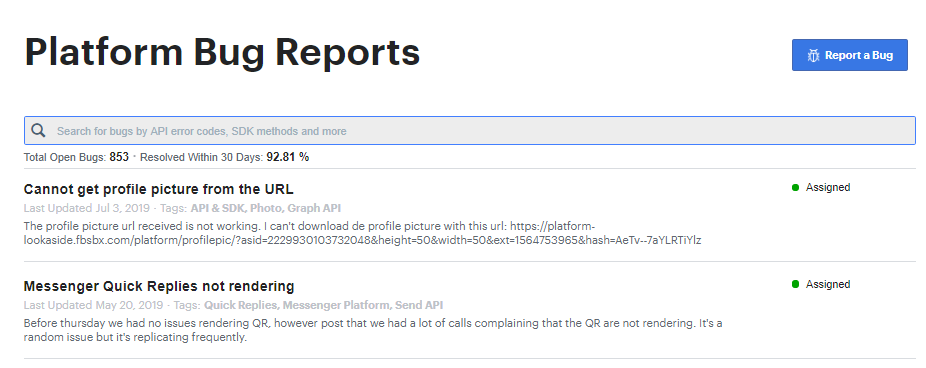
Figure 39: Facebook developers can report bugs, monitor the status of reported bugs, and check if bugs have been previously reported.
As mentioned earlier, some providers will leverage the developer Q&A website StackOverflow to handle technical questions about their API. Again, Google has nearly 20 tags for the Google Maps platform. While the portal is clear that Google does not run the site, members of the Google Maps Platform team actually monitor the tags and offer help along with community members.
Offering different avenues of support, meeting developers where they engage versus always requiring them to come to you, provides value that goes beyond good customer service. That flexibility shows how serious you are about treating your API as a product, helps improve the overall DX when developers consume an API, and also serves to foster a community around the API. Smart providers also use their support channels as a feedback loop by tracking the kinds of questions being asked and using that information to improve not only their portal but the API and their service as a whole.
Your Perfect API Portal
If this looks like a daunting list, it is (and we'll no doubt be adding to it). In today's climate, APIs are a serious and essential part of a business strategy. Your API developer portal (as well as any unofficial extensions of it) should reflect as much and show that your organization treats its APIs like products that you're making a significant investment into and that you stand behind.
It's important to keep in mind that users will be coming to your portal at various stages of their API journeys. So, the content it offers, its design, and the degree to which it encourages engagement should reflect your commitment to helping them along, every step of the way. This means answering beginners' questions about what the API is (even what an API is), the value it provides, and how it can help solve a user's problems. Success means helping users both start with the API right away and providing them with the guidance and best practices they need to create some short-term wins. And once they've become a consumer of the API, the portal gives them the support they need while acting as a gateway to an active ecosystem.
Of course, some APIs may be intentionally trivial, and a full-blown portal could be unwarranted. But for any organization that truly wants to scale its business through its API ecosystem, the criteria listed in this paper should be thought of as a standard designed to maximize the satisfaction and therefore the loyalty of your target developer community.
An API Strategy Blueprint
The topic of developer engagement is a major component of our four-stage blueprint that organizations should follow in order to maximize their chances of success in the API economy (for an in-depth discussion of this blueprint, be sure to read our whitepaper on API Strategy Essentials , developed in partnership with MuleSoft).
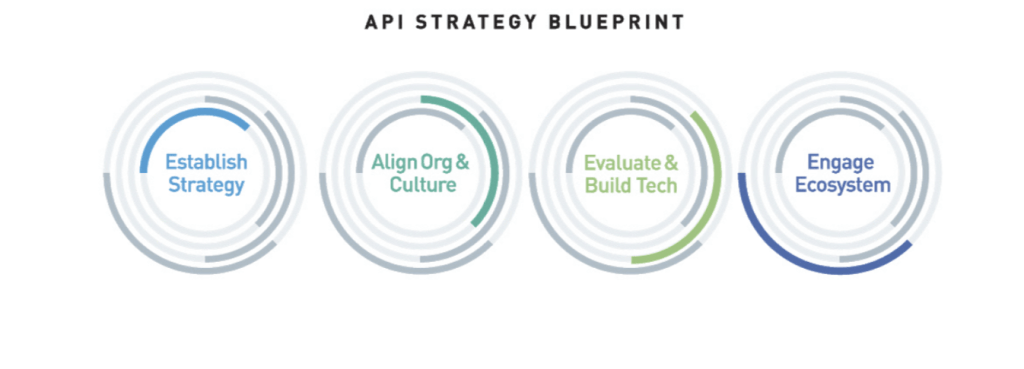
Figure 40: The blueprint for API economy success is broken into four critical areas, none of which can be overlooked by organizations hoping to lead competitors in their fields. The four-stages run concurrently (are not necessarily sequential); iteration with an eye towards improvement is constant, and measurement against quantifiable objectives within each stage is always ongoing.
The first stage of the blueprint — Establish Digital Strategy — has almost nothing specific to do with API strategy. Instead, it focuses on aligning stakeholders around an understanding of the organization's core capabilities and competencies and how best to bring them to market as digital offerings that drive great business outcomes and amazing end-to-end customer experiences.
The same approach applies to whether the customer is external or internal to the organization. Understanding and Organizing Successful API Ecosystems is a key component of this first stage and requires organizations to think well beyond their four walls in terms of what a market-leading end-to-end customer experience is, and the ecosystem that's necessary to make it happen.
The second stage of the blueprint — Align Culture and Organization — is about getting the entire organization to think differently about what it takes to deliver those great end-to-end customer experiences. Even if it means reorganizing the company. This also means looking at those experiences as finished assemblies of discrete capabilities, some parts of which are sourced internally, some of which can be sourced externally, but all of which are organizationally managed and engaged as individual services that are carefully choreographed, with the help of APIs, to produce the final outcome.
As you can see, so far, the blueprint has been focused on areas that are more about the business, organization, and culture than they are about putting any technology in place. But this is where the third stage comes into play, covering both the core API platform as well as any adjacent technologies that are necessary to install, secure, manage, and measure the API-driven fabric that will technologically enable your business strategy.
With the first three stages being about getting the business strategy, organization, and tech in place, the fourth stage is about customer-centrically engaging your ecosystem in ways that are wholly consistent with the desired business outcomes, experiences, and values set forth in those other stages. Engaging developers with the best in class API developer portal, the subject of this paper, is critical to succeeding in this fourth stage of the API Strategy Blueprint.
Extend your AI capabilities with MuleSoft.

Start your trial.
Try MuleSoft Anypoint Platform free for 30 days. No credit card, no installations.

Talk to an expert.
Tell us a bit more so the right person can reach out faster.

Stay up to date.
Get the latest news about integration, automation, API management, and AI.
